Latest AMI across all regions
Overview
Imagine you were working on workloads in the Singapore (ap-southeast-1) region. your boss then told you deploy those workloads to the US (us-east-1) region. Everything appeared to be working fine initially; however, you realized that the AMI used by your EC2 instances in Singapore could not be applied to EC2 instances in US.
To address the issue above, you can use the System Manager parameter type in the EC2 AMI parameter in your template. A System Manager parameter type allows you to reference parameters held in the System Manager Parameter Store.
Fetching the latest AMI of Amazon Linux 2023
This part shows how to fetch the latest AMI of Amazon Linux 2023. To read more, please checkout the Further readings part.
1. Open Cloud9 environment, search for ~/environment/ws2-material/workshop/fundamental/latest-ami.yml.
2. Update the AmiId parameter to:
AmiID:
  Type: AWS::SSM::Parameter::Value<AWS::EC2::Image::Id>
  Description: The ID of the AMI.
  Default: '/aws/service/ami-amazon-linux-latest/al2023-ami-kernel-6.1-x86_64'
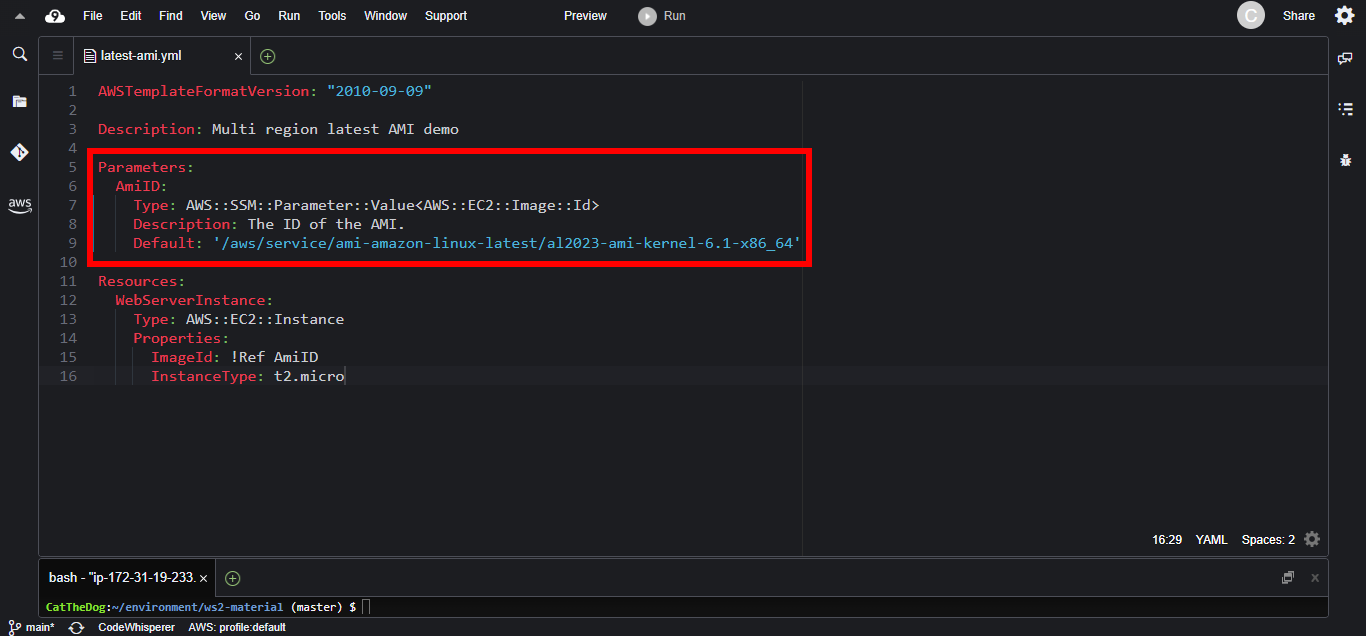
3. Execute the command to create a new stack.
cd ~/environment/ws2-material/workshop/fundamental
aws cloudformation create-stack --stack-name latest-ami --template-body file://latest-ami.yml
4. Go to EC2 and validate the AMI of your instance

Cleaning up
Run the delete command to delete your stack:
aws cloudformation delete-stack --stack-name latest-ami