Intrinsic functions
What is Intrinsic Function ?
AWS CloudFormation provides you with some built-in functions called Intrinsic Function that help you manage your stack, values returned by calling those functions are not available until runtime. Without Intrinsic Function, you are limited to very basic templates, like the one in the 3.2 chapter.
Ref
The Ref intrinsic function returns the value of the specified parameter or resource. In the last chapter, we have hard-coded the ImageId in the template, which is very troublesome for us to customize our stack with the other OS’s ImageId. The solution here is to create a new parameter called ImageId and pass it to our instance.
ImageId:
  Type: AWS::EC2::Image::Id
  Description: 'The ID of the Image.'
We define a ImageId parameter of type AWS::EC2::Image::Id then use Ref to pass it to the EC2 instance property.
Resources:
  WebServerInstance:
    Type: AWS::EC2::Instance
    Properties:
      InstanceType: !Ref InstanceType
      # Use !Ref function in ImageId property
      ImageId: !Ref ImageId
Fn::Join
Fn::Join is an Intrinsic Function that helps concatenating two or more strings with a delimiter between them. For example, you can use !Join [ "-", [ "value1", "value2" ] ] to get the “value1-value2” string.
How do we apply it to our template? The answer is very easy, we can utilize Fn::Join to assign tags to the resources defined in our template. Let’s take a look at the illustration.
Resources:
  WebServerInstance:
    Type: AWS::EC2::Instance
    Properties:
      ImageId: !Ref ImageId
      InstanceType: !Ref InstanceType
      # Assign tag using Join
      Tags:
        - Key: Name
          Value: !Join [ '-', [ !Ref InstanceType, webserver ] ]
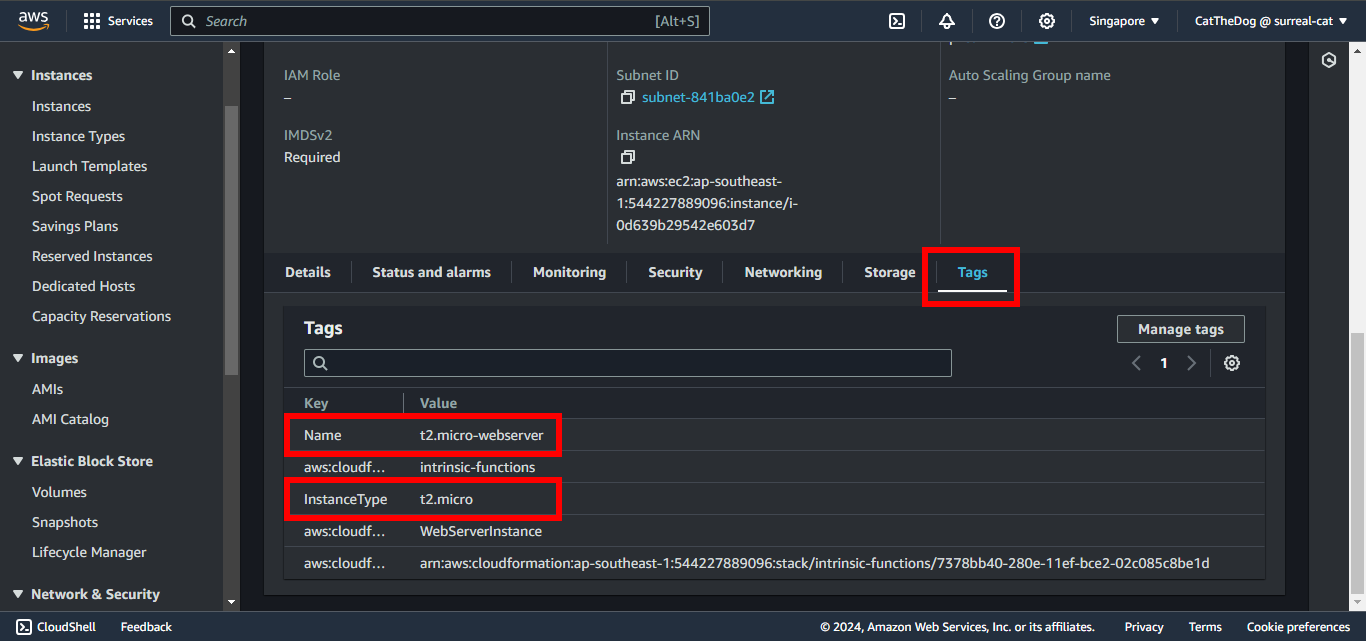
Once the EC2 instance is created, it is automatically assigned a tag with a key Name and a value “t2.micro-webserver” if you use t2.micro as instance type.
Fn::Sub
Another way to create a customized string is Fn::Sub. Sub stands for Substitute, it will replace variables in an input string with values that you specify. Fn::Sub is a bit harder than Fn::Join and Ref, so that we will learn the syntax of Fn::Sub before delving into examples.
!Sub
  - String
  - Var1Name: Var1Value
    Var2Name: Var2Value
- String: The string containing variables in which you want to replace with your values.
- VarName: The name of a variable that you included in the String parameter.
- VarValue: The value that CloudFormation substitutes for the associated variable name at runtime.
For example:
!Sub
  - ${InstanceType}
  - InstanceType: !Ref InstanceType
If you include template parameter names or resource logical IDs, such as ${InstanceType}, in the String parameter, CloudFormation returns the same values as if you used the Ref intrinsic function. That means, !Ref InstanceType is equal to !Sub ${InstanceType}.
Let’s apply Fn::Sub to our template by assigning a new tag with Key InstanceType to the EC2 instance.
Resources:
  WebServerInstance:
    Type: AWS::EC2::Instance
    Properties:
      ImageId: !Ref ImageId
      InstanceType: !Ref InstanceType
      Tags:
        - Key: Name
          Value: !Join [ '-', [ !Ref InstanceType, webserver ] ]
        - Key: InstanceType
          Value: !Sub ${InstanceType}
Reinforce your understanding
1. Open Cloud9 then find ~/environment/ws2-material/workshop/fundamental/intrinsic-functions.yml.
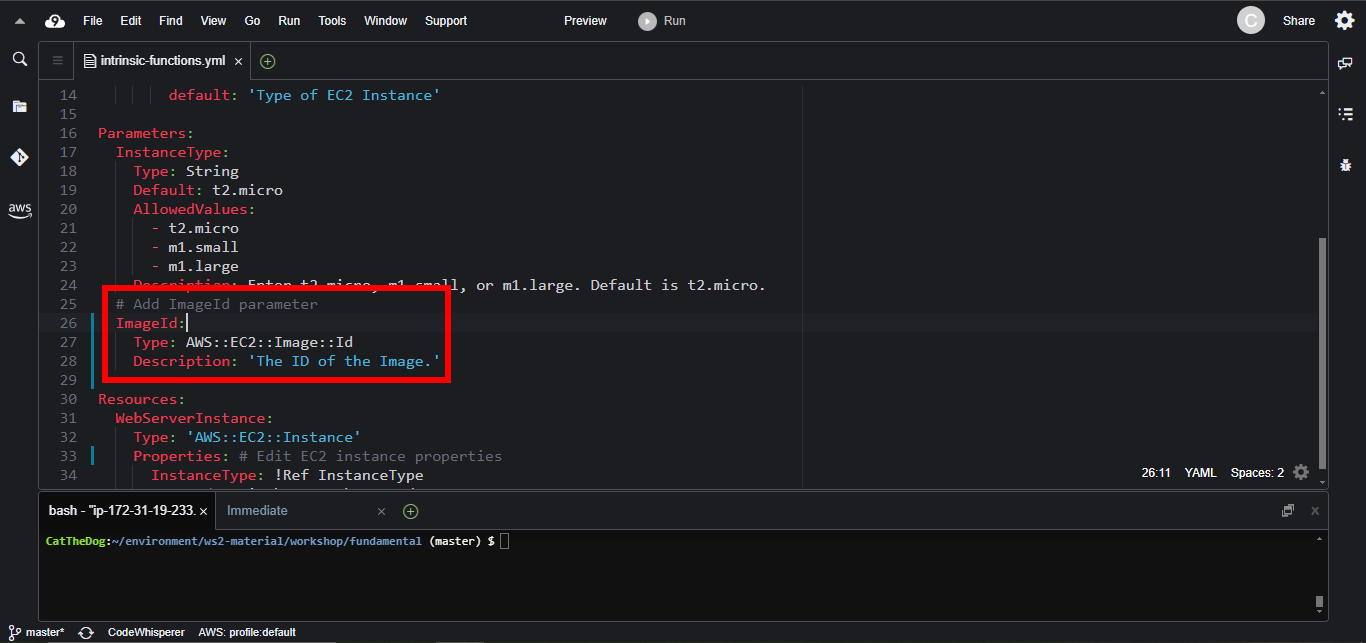
2. Place the ImageId parameter below the InstanceType parameter.
ImageId:
  Type: AWS::EC2::Image::Id
  Description: 'The ID of the Image.'
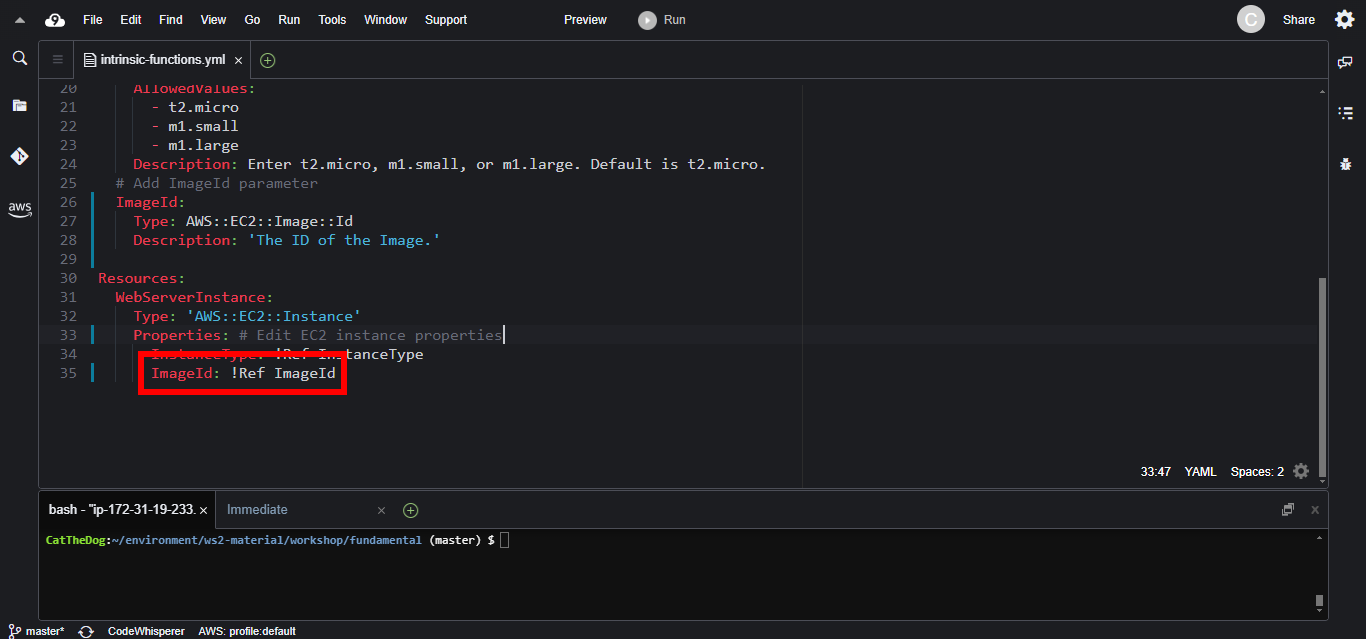
3. Replace the ImageId property.
Resources:
  WebServerInstance:
    Type: AWS::EC2::Instance
    Properties:
      InstanceType: !Ref InstanceType
      # Use !Ref function in ImageId property
      ImageId: !Ref ImageId
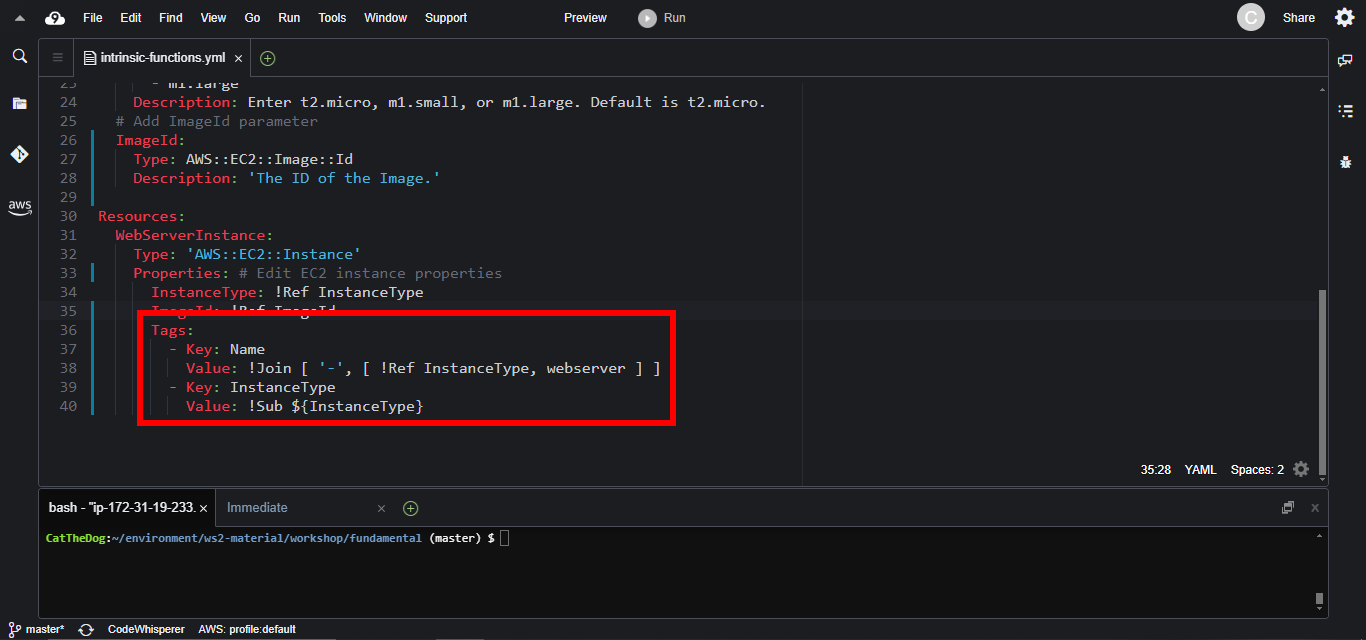
4. Add the Tags property to your instance.
Resources:
  WebServerInstance:
    Type: AWS::EC2::Instance
    Properties:
      ImageId: !Ref ImageId
      InstanceType: !Ref InstanceType
      Tags:
        - Key: Name
          Value: !Join [ '-', [ !Ref InstanceType, webserver ] ]
        - Key: InstanceType
          Value: !Sub ${InstanceType}
5. Run the create-stack command to create a new stack.
cd ~/environment/ws2-material/workshop/fundamental
aws cloudformation create-stack --stack-name intrinsic-functions --template-body file://intrinsic-functions.yml --parameters ParameterKey=ImageId,ParameterValue="Replace with your ImageId"

6. Review the EC2 instance to confirm that it is created properly.
If there is no failure during the stack creation, you will obtain an EC2 instance like the instance in the image below.
Cleaning up
Run the delete command to delete your stack:
aws cloudformation delete-stack --stack-name intrinsic-functions
Further readings
- Other helpful intrinsic functions that you may need:
- Fn::Base64: Encode a string to its corresponding Base64 representation.
- Fn::Cidr: returns an array of CIDR address block.
- Fn::GetAZs: returns an array that lists Availability Zones for a specified Region.
- Fn::Length: returns the number of elements in an array.
- Fn::Select: returns a single object from a list of objects by index.
- Fn::Split: splits the string into an array by the delimiter. Split is the opposite of Join.
- Fn::ToJsonString: turns an object or an array into its JSON representation.
- Intrinsic functions.